The source files can be found in user_guide/.
Introduction to the user guide
The user guide is a short tour of PortfolioOptimisers.jl. Each page gives you one minimal call for a task, so you can build a portfolio without reading the source or the reference. A page covers the common path of its topic and stops there. For the variants of a topic and the choices between them, follow the links into the Examples, where each page covers one topic in depth.
The pipeline
PortfolioOptimisers.jl is organised as a pipeline. Data passes through a sequence of stages, and each stage is an estimator that you can replace with another:
data ─▶ moments / prior ─▶ optimiser ─▶ constraints & costs ─▶ validation ─▶ post-processingThe first pages of the guide follow the stages, and the later pages cover topics that span them:
- Data and priors turns prices into returns, and returns into a prior, which holds the expected returns and the covariance. The moments and priors examples show more estimators and the priors that take views.
- Optimisers makes one call from each family of optimisers: naive, JuMP (
MeanRisk, risk budgeting, near-optimal centering), clustering, and the optimisers that combine other optimisers. The optimiser examples show the objectives and the variants of each family. - Risk measures lists every risk measure that you can ask an optimiser to minimise, with its alias, what it penalises, and the optimisers that accept it.
- Constraints and costs adds weight bounds, group constraints, factor exposures, turnover and fees. The constraints and costs examples also cover budgets, regularisation and constraints that you write yourself.
- Validation and tuning runs cross-validation and a search over parameters. The validation examples show the other splitters and searches.
- Post-processing turns weights into whole shares and plots the result. The post-processing examples also cover the plots in detail and the attribution of the performance.
- Choosing a strategy asks four questions about your mandate: compute, rebalance frequency, trust in your estimates, and capital. The investor profiles apply the answers from start to finish.
- The point-in-time universe starts from a price table with gaps and ends with a walk-forward. It shows what the library does when an asset lists, delists or is suspended inside your sample. Some steps handle the gap, and the others throw an error that names the asset.
- The online walk-forward warms one estimator up on the first training window and then adds the rows of each later fold to it, where a batch walk-forward refits. It shows the constructor that selects this, the weights of the two runs side by side, the wrapper for an estimator with no exact update, where the online run is faster, and how to resume a run.
- Online portfolio selection runs rules that move the allocation after each period, from the ratio of each asset's price to its price one period before. It runs the rules that follow the winner and the rules that follow the loser on a market that reverts and on a market that trends. It compares every rule with three portfolios chosen in hindsight, tunes a rate, and ends with the list of rules by group.
Reading the API
Two conventions hold across the library. When you know them, you can read the short keyword names and the calls on every page.
Keyword names
An estimator that holds other estimators takes each of them through a short keyword. A keyword that ends in e takes an estimator, a configuration that has not run yet. Many of these keywords also take the result that the estimator computes. So pe takes a prior estimator or a computed prior, and cle takes a clustering estimator or a computed clustering.
| Keyword | Takes | Keyword | Takes |
|---|---|---|---|
pe | prior estimator or prior | slv | solver, or a vector of solvers |
ce | covariance estimator | me | expected returns estimator |
ve | variance estimator | de | distance estimator |
mp | matrix processing estimator | pdm | positive definite matrix estimator |
cle | clustering estimator or clustering | re | regression estimator or regression |
wb | weight bounds | opt | optimiser configuration (JuMPOptimiser or HierarchicalOptimiser) |
r | risk measure | obj | objective function |
rd | returns data (ReturnsResult) | fb | fallback optimiser |
Functions and risk measures
A stage runs when you call a function on its estimator: prior(EmpiricalPrior(), rd), optimise(MeanRisk(…)), clusterise(…). A risk measure is different. You pass it to the r keyword of an optimiser. To get the risk of a portfolio outside an optimiser, you call expected_risk with the measure, the weights and the prior. Risk measures shows both uses.
The data
Every page of the guide uses the same data, the last 253 daily prices of 20 S&P 500 stocks, which end on 2022-12-28. A result on one page is therefore comparable with a result on another. We load the prices, compute the returns and plot the prior.
using PortfolioOptimisers, CSV, TimeSeries, StatsPlots, GraphRecipesX = TimeArray(CSV.File(joinpath(@__DIR__, "../examples/SP500.csv.gz")); timestamp = :Date)[(end - 252):end]rd = prices_to_returns(X)plot_prior(prior(EmpiricalPrior(), rd), rd)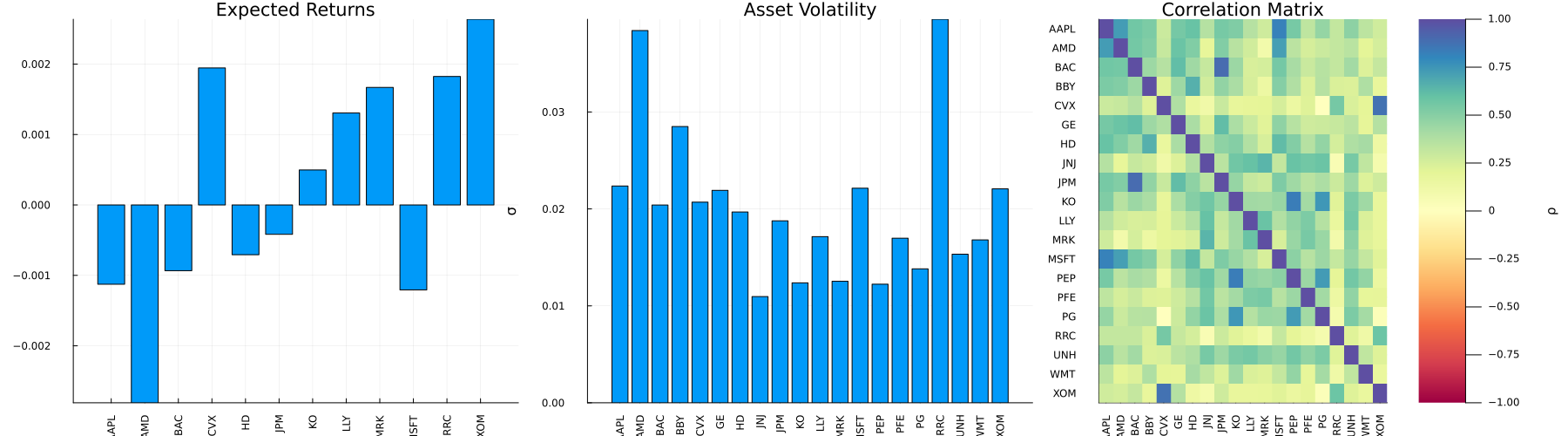
This page was generated using Literate.jl.