PortfolioOptimisers.jlQuantitative portfolio construction
Democratising, demystifying, and derisking investing

DANGER
Investing conveys real risk, the entire point of portfolio optimisation is to minimise it to tolerable levels. The examples use outdated data and a variety of stocks (including what I consider to be meme stocks) for demonstration purposes only. None of the information in this documentation should be taken as financial advice. Any advice is limited to improving portfolio construction, most of which is common investment and statistical knowledge.
Portfolio optimisation is the science of either:
Minimising risk whilst keeping returns to acceptable levels.
Maximising returns whilst keeping risk to acceptable levels.
To some definition of acceptable, and with any number of additional constraints available to the optimisation type.
There exist myriad statistical, pre- and post-processing, optimisations, and constraints that allow one to explore an extensive landscape of "optimal" portfolios.
PortfolioOptimisers.jl is an attempt at providing as many of these as possible under a single banner. We make extensive use of Julia's type system, module extensions, and multiple dispatch to simplify development and maintenance.
Please visit the examples and API for details.
PortfolioOptimisers.jl is under active development and still in v0.*.*. Therefore, breaking changes should be expected with v0.X.0 releases. All other releases will fall under v0.X.Y.
The documentation is still under construction.
Testing coverage is still under 95 %. We're mainly missing assertion tests, but some lesser used features are partially or wholly untested.
Please feel free to submit issues, discussions and/or PRs regarding missing docs, examples, features, tests, and bugs.
PortfolioOptimisers.jl is a registered package, so installation is as simple as:
julia> using Pkg
julia> Pkg.add(PackageSpec(; name = "PortfolioOptimisers"))The library is quite powerful and extremely flexible. Here is what a very basic end-to-end workflow can look like. The examples contain more thorough explanations and demos. The API docs contain toy examples of the many, many features.
First we import the packages we will need for the example.
StatsPlots and GraphRecipes are needed to load the plotting extension.
Clarabel and HiGHS are the optimisers we will use.
YFinance and TimeSeries for downloading and preprocessing price data.
PrettyTables and DataFrames for displaying the results.
# Import module and plotting extension.
using PortfolioOptimisers, StatsPlots, GraphRecipes
# Import optimisers.
using Clarabel, HiGHS
# Download data.
using YFinance, TimeSeries
# Pretty printing.
using PrettyTables, DataFrames
# Format for pretty tables.
fmt1 = (v, i, j) -> begin
if j == 1
return Date(v)
else
return v
end
end;
fmt2 = (v, i, j) -> begin
if j ∈ (1, 2, 3)
return v
else
return isa(v, Number) ? "$(round(v*100, digits=3)) %" : v
end
end;For illustration purposes, we will use a set of popular meme stocks. We need to download and set the price data in a format PortfolioOptimisers.jl can consume.
# Function to convert prices to time array.
function stock_price_to_time_array(x)
# Only get the keys that are not ticker or datetime.
coln = collect(keys(x))[3:end]
# Convert the dictionary into a matrix.
m = hcat([x[k] for k in coln]...)
return TimeArray(x["timestamp"], m, Symbol.(coln), x["ticker"])
end
# Tickers to download. These are popular meme stocks, use something better.
assets = sort!(["SOUN", "RIVN", "GME", "AMC", "SOFI", "ENVX", "ANVS", "LUNR", "EOSE", "SMR",
"NVAX", "UPST", "ACHR", "RKLB", "MARA", "LGVN", "LCID", "CHPT", "MAXN",
"BB"])
# Prices date range.
Date_0 = "2024-01-01"
Date_1 = "2025-10-05"
# Download the price data using YFinance.
prices = get_prices.(assets; startdt = Date_0, enddt = Date_1)
prices = stock_price_to_time_array.(prices)
prices = hcat(prices...)
cidx = colnames(prices)[occursin.(r"adj", string.(colnames(prices)))]
prices = prices[cidx]
TimeSeries.rename!(prices, Symbol.(assets))
pretty_table(prices[(end - 5):end]; formatters = [fmt1])┌────────────┬─────────┬─────────┬─────────┬─────────┬─────────┬─────────┬──────
│ timestamp │ ACHR │ AMC │ ANVS │ BB │ CHPT │ ENVX │ ⋯
│ DateTime │ Float64 │ Float64 │ Float64 │ Float64 │ Float64 │ Float64 │ Flo ⋯
├────────────┼─────────┼─────────┼─────────┼─────────┼─────────┼─────────┼──────
│ 2025-09-26 │ 9.28 │ 2.89 │ 1.97 │ 4.96 │ 10.84 │ 10.09 │ 1 ⋯
│ 2025-09-29 │ 9.65 │ 3.0 │ 2.04 │ 5.0 │ 11.05 │ 9.97 │ 1 ⋯
│ 2025-09-30 │ 9.58 │ 2.9 │ 2.07 │ 4.88 │ 10.92 │ 9.97 │ 1 ⋯
│ 2025-10-01 │ 9.81 │ 2.95 │ 2.13 │ 4.79 │ 11.63 │ 11.11 │ 1 ⋯
│ 2025-10-02 │ 10.18 │ 3.15 │ 2.23 │ 4.75 │ 11.32 │ 11.65 │ 1 ⋯
│ 2025-10-03 │ 11.57 │ 3.06 │ 2.22 │ 4.5 │ 11.94 │ 11.92 │ ⋯
└────────────┴─────────┴─────────┴─────────┴─────────┴─────────┴─────────┴──────
14 columns omittedNow we can compute our returns by calling prices_to_returns.
# Compute the returns.
rd = prices_to_returns(prices)ReturnsResult
nx ┼ 20-element Vector{String}
X ┼ 440×20 Matrix{Float64}
nf ┼ nothing
F ┼ nothing
ts ┼ 440-element Vector{DateTime}
iv ┼ nothing
ivpa ┴ nothingPortfolioOptimisers.jl uses JuMP for handling the optimisation problems, which means it is solver agnostic and therefore does not ship with any pre-installed solver. Solver lets us define the optimiser factory, its solver-specific settings, and JuMP's solution acceptance criteria.
# Define the continuous solver.
slv = Solver(; name = :clarabel1, solver = Clarabel.Optimizer,
settings = Dict("verbose" => false, "max_step_fraction" => 0.9),
check_sol = (; allow_local = true, allow_almost = true))Solver
name ┼ Symbol: :clarabel1
solver ┼ UnionAll: Clarabel.MOIwrapper.Optimizer
settings ┼ Dict{String, Real}: Dict{String, Real}("verbose" => false, "max_step_fraction" => 0.9)
check_sol ┼ @NamedTuple{allow_local::Bool, allow_almost::Bool}: (allow_local = true, allow_almost = true)
add_bridges ┴ Bool: truePortfolioOptimisers.jl implements a number of optimisation types as estimators. All the ones which use mathematical optimisation require a [JuMPOptimiser]-(@ref) structure which defines general solver constraints. This structure in turn requires an instance (or vector) of Solver.
opt = JuMPOptimiser(; slv = slv);Here we will use the traditional Mean-Risk [MeanRisk]-(@ref) optimisation estimator, which defaults to the Markowitz optimisation (minimum risk mean-variance optimisation).
# Vanilla (Markowitz) mean risk optimisation.
mr = MeanRisk(; opt = opt)MeanRisk
opt ┼ JuMPOptimiser
│ pe ┼ EmpiricalPrior
│ │ ce ┼ PortfolioOptimisersCovariance
│ │ │ ce ┼ Covariance
│ │ │ │ me ┼ SimpleExpectedReturns
│ │ │ │ │ w ┼ nothing
│ │ │ │ │ idx ┴ nothing
│ │ │ │ ce ┼ GeneralCovariance
│ │ │ │ │ ce ┼ SimpleCovariance: SimpleCovariance(true)
│ │ │ │ │ w ┼ nothing
│ │ │ │ │ idx ┴ nothing
│ │ │ │ alg ┴ Full()
│ │ │ mp ┼ DenoiseDetoneAlgMatrixProcessing
│ │ │ │ pdm ┼ Posdef
│ │ │ │ │ alg ┼ UnionAll: NearestCorrelationMatrix.Newton
│ │ │ │ │ kwargs ┴ @NamedTuple{}: NamedTuple()
│ │ │ │ dn ┼ nothing
│ │ │ │ dt ┼ nothing
│ │ │ │ alg ┼ nothing
│ │ │ │ order ┴ DenoiseDetoneAlg()
│ │ me ┼ SimpleExpectedReturns
│ │ │ w ┼ nothing
│ │ │ idx ┴ nothing
│ │ horizon ┴ nothing
│ slv ┼ Solver
│ │ name ┼ Symbol: :clarabel1
│ │ solver ┼ UnionAll: Clarabel.MOIwrapper.Optimizer
│ │ settings ┼ Dict{String, Real}: Dict{String, Real}("verbose" => false, "max_step_fraction" => 0.9)
│ │ check_sol ┼ @NamedTuple{allow_local::Bool, allow_almost::Bool}: (allow_local = true, allow_almost = true)
│ │ add_bridges ┴ Bool: true
│ wb ┼ WeightBounds
│ │ lb ┼ Float64: 0.0
│ │ ub ┴ Float64: 1.0
│ bgt ┼ Float64: 1.0
│ sbgt ┼ nothing
│ lt ┼ nothing
│ st ┼ nothing
│ lcse ┼ nothing
│ cte ┼ nothing
│ gcarde ┼ nothing
│ sgcarde ┼ nothing
│ smtx ┼ nothing
│ sgmtx ┼ nothing
│ slt ┼ nothing
│ sst ┼ nothing
│ sglt ┼ nothing
│ sgst ┼ nothing
│ tn ┼ nothing
│ fees ┼ nothing
│ sets ┼ nothing
│ tr ┼ nothing
│ ple ┼ nothing
│ ret ┼ ArithmeticReturn
│ │ ucs ┼ nothing
│ │ lb ┼ nothing
│ │ mu ┴ nothing
│ sca ┼ SumScalariser()
│ ccnt ┼ nothing
│ cobj ┼ nothing
│ sc ┼ Int64: 1
│ so ┼ Int64: 1
│ ss ┼ nothing
│ card ┼ nothing
│ scard ┼ nothing
│ nea ┼ nothing
│ l1 ┼ nothing
│ l2 ┼ nothing
│ linf ┼ nothing
│ lp ┼ nothing
│ strict ┴ Bool: false
r ┼ Variance
│ settings ┼ RiskMeasureSettings
│ │ scale ┼ Float64: 1.0
│ │ ub ┼ nothing
│ │ rke ┴ Bool: true
│ sigma ┼ nothing
│ chol ┼ nothing
│ rc ┼ nothing
│ alg ┴ SquaredSOCRiskExpr()
obj ┼ MinimumRisk()
wi ┼ nothing
fb ┴ nothingAs you can see, there are a lot of fields in this structure, which correspond to a wide variety of optimisation constraints. We will explore these in the examples. For now, we will perform the optimisation via [optimise]-(@ref).
# Perform the optimisation, res.w contains the optimal weights.
res = optimise(mr, rd)MeanRiskResult
oe ┼ DataType: DataType
pa ┼ ProcessedJuMPOptimiserAttributes
│ pr ┼ LowOrderPrior
│ │ X ┼ 440×20 Matrix{Float64}
│ │ mu ┼ 20-element Vector{Float64}
│ │ sigma ┼ 20×20 Matrix{Float64}
│ │ chol ┼ nothing
│ │ w ┼ nothing
│ │ ens ┼ nothing
│ │ kld ┼ nothing
│ │ ow ┼ nothing
│ │ rr ┼ nothing
│ │ f_mu ┼ nothing
│ │ f_sigma ┼ nothing
│ │ f_w ┴ nothing
│ wb ┼ WeightBounds
│ │ lb ┼ 20-element StepRangeLen{Float64, Base.TwicePrecision{Float64}, Base.TwicePrecision{Float64}, Int64}
│ │ ub ┴ 20-element StepRangeLen{Float64, Base.TwicePrecision{Float64}, Base.TwicePrecision{Float64}, Int64}
│ lt ┼ nothing
│ st ┼ nothing
│ lcsr ┼ nothing
│ ctr ┼ nothing
│ gcardr ┼ nothing
│ sgcardr ┼ nothing
│ smtx ┼ nothing
│ sgmtx ┼ nothing
│ slt ┼ nothing
│ sst ┼ nothing
│ sglt ┼ nothing
│ sgst ┼ nothing
│ tn ┼ nothing
│ fees ┼ nothing
│ plr ┼ nothing
│ ret ┼ ArithmeticReturn
│ │ ucs ┼ nothing
│ │ lb ┼ nothing
│ │ mu ┴ 20-element Vector{Float64}
retcode ┼ OptimisationSuccess
│ res ┴ Dict{Any, Any}: Dict{Any, Any}()
sol ┼ JuMPOptimisationSolution
│ w ┴ 20-element Vector{Float64}
model ┼ A JuMP Model
│ ├ solver: Clarabel
│ ├ objective_sense: MIN_SENSE
│ │ └ objective_function_type: JuMP.QuadExpr
│ ├ num_variables: 21
│ ├ num_constraints: 4
│ │ ├ JuMP.AffExpr in MOI.EqualTo{Float64}: 1
│ │ ├ Vector{JuMP.AffExpr} in MOI.Nonnegatives: 1
│ │ ├ Vector{JuMP.AffExpr} in MOI.Nonpositives: 1
│ │ └ Vector{JuMP.AffExpr} in MOI.SecondOrderCone: 1
│ └ Names registered in the model
│ └ :G, :bgt, :dev_1, :dev_1_soc, :k, :lw, :obj_expr, :ret, :risk, :risk_vec, :sc, :so, :variance_flag, :variance_risk_1, :w, :w_lb, :w_ub
fb ┴ nothingThe solution lives in the sol field, but the weights can be accessed via the w property.
PortfolioOptimisers.jl also has the capability to perform finite allocations, which is useful for those of us without infinite money. There are two ways to do so, a greedy algorithm [GreedyAllocation]-(@ref) that does not guarantee optimality but is fast and always converges, and a discrete allocation [DiscreteAllocation]-(@ref) which uses mixed-integer programming (MIP) and requires a capable solver.
Here we will use the latter.
# Define the MIP solver for finite discrete allocation.
mip_slv = Solver(; name = :highs1, solver = HiGHS.Optimizer,
settings = Dict("log_to_console" => false),
check_sol = (; allow_local = true, allow_almost = true))
# Discrete finite allocation.
da = DiscreteAllocation(; slv = mip_slv)DiscreteAllocation
slv ┼ Solver
│ name ┼ Symbol: :highs1
│ solver ┼ DataType: DataType
│ settings ┼ Dict{String, Bool}: Dict{String, Bool}("log_to_console" => 0)
│ check_sol ┼ @NamedTuple{allow_local::Bool, allow_almost::Bool}: (allow_local = true, allow_almost = true)
│ add_bridges ┴ Bool: true
sc ┼ Int64: 1
so ┼ Int64: 1
wf ┼ AbsoluteErrorWeightFinaliser()
fb ┼ GreedyAllocation
│ unit ┼ Int64: 1
│ args ┼ Tuple{}: ()
│ kwargs ┼ @NamedTuple{}: NamedTuple()
│ fb ┴ nothingThe discrete allocation minimises the absolute or relative L1- or L2-norm (configurable) between the ideal allocation to the one you can afford plus the leftover cash. As such, it needs to know a few extra things, namely the optimal weights res.w, a vector of the latest prices vec(values(prices[end])), and available cash which we define to be 4206.90.
# Perform the finite discrete allocation, uses the final asset
# prices, and an available cash amount. This is for us mortals
# without infinite wealth.
mip_res = optimise(da, res.w, vec(values(prices[end])), 4206.90)DiscreteAllocationResult
oe ┼ DataType: DataType
retcode ┼ OptimisationSuccess
│ res ┴ nothing
s_retcode ┼ nothing
l_retcode ┼ OptimisationSuccess
│ res ┴ Dict{Any, Any}: Dict{Any, Any}()
shares ┼ 20-element SubArray{Float64, 1, Matrix{Float64}, Tuple{Base.Slice{Base.OneTo{Int64}}, Int64}, true}
cost ┼ 20-element SubArray{Float64, 1, Matrix{Float64}, Tuple{Base.Slice{Base.OneTo{Int64}}, Int64}, true}
w ┼ 20-element SubArray{Float64, 1, Matrix{Float64}, Tuple{Base.Slice{Base.OneTo{Int64}}, Int64}, true}
cash ┼ Float64: 0.20003798008110607
s_model ┼ nothing
l_model ┼ A JuMP Model
│ ├ solver: HiGHS
│ ├ objective_sense: MIN_SENSE
│ │ └ objective_function_type: JuMP.AffExpr
│ ├ num_variables: 21
│ ├ num_constraints: 42
│ │ ├ JuMP.AffExpr in MOI.GreaterThan{Float64}: 1
│ │ ├ Vector{JuMP.AffExpr} in MOI.NormOneCone: 1
│ │ ├ JuMP.VariableRef in MOI.GreaterThan{Float64}: 20
│ │ └ JuMP.VariableRef in MOI.Integer: 20
│ └ Names registered in the model
│ └ :cabs_err, :cr, :r, :sc, :so, :u, :x
fb ┴ nothingWe can display the results in a table.
# View the results.
df = DataFrame(:assets => rd.nx, :shares => mip_res.shares, :cost => mip_res.cost,
:opt_weights => res.w, :mip_weights => mip_res.w)
pretty_table(df; formatters = [fmt2])┌────────┬─────────┬─────────┬─────────────┬─────────────┐
│ assets │ shares │ cost │ opt_weights │ mip_weights │
│ String │ Float64 │ Float64 │ Float64 │ Float64 │
├────────┼─────────┼─────────┼─────────────┼─────────────┤
│ ACHR │ 0.0 │ 0.0 │ 0.0 % │ 0.0 % │
│ AMC │ 73.0 │ 223.38 │ 5.324 % │ 5.31 % │
│ ANVS │ 22.0 │ 48.84 │ 1.249 % │ 1.161 % │
│ BB │ 273.0 │ 1228.5 │ 29.184 % │ 29.203 % │
│ CHPT │ 11.0 │ 131.34 │ 3.002 % │ 3.122 % │
│ ENVX │ 0.0 │ 0.0 │ 0.0 % │ 0.0 % │
│ EOSE │ 8.0 │ 100.8 │ 2.435 % │ 2.396 % │
│ GME │ 0.0 │ 0.0 │ 0.0 % │ 0.0 % │
│ LCID │ 1.0 │ 24.77 │ 0.638 % │ 0.589 % │
│ LGVN │ 325.0 │ 256.1 │ 6.089 % │ 6.088 % │
│ LUNR │ 0.0 │ 0.0 │ 0.0 % │ 0.0 % │
│ MARA │ 1.0 │ 18.82 │ 0.613 % │ 0.447 % │
│ MAXN │ 0.0 │ 0.0 │ 0.0 % │ 0.0 % │
│ NVAX │ 28.0 │ 264.88 │ 6.21 % │ 6.297 % │
│ RIVN │ 55.0 │ 750.75 │ 17.897 % │ 17.847 % │
│ ⋮ │ ⋮ │ ⋮ │ ⋮ │ ⋮ │
└────────┴─────────┴─────────┴─────────────┴─────────────┘
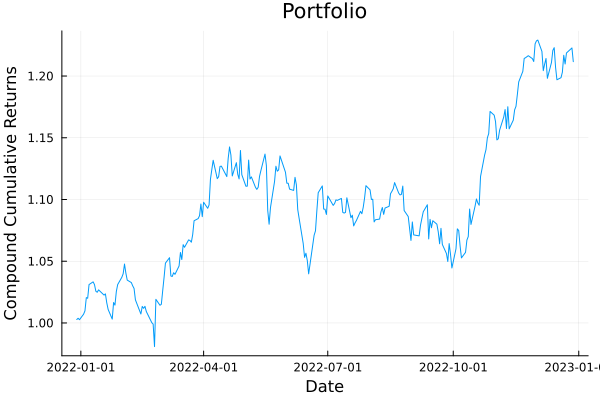
5 rows omittedWe can also visualise the portfolio using various plotting functions. For example, we can plot the portfolio's cumulative returns, in this case compound returns.
# Plot the portfolio cumulative returns of the finite allocation portfolio.
plot_ptf_cumulative_returns(mip_res.w, rd.X; ts = rd.ts, compound = true)
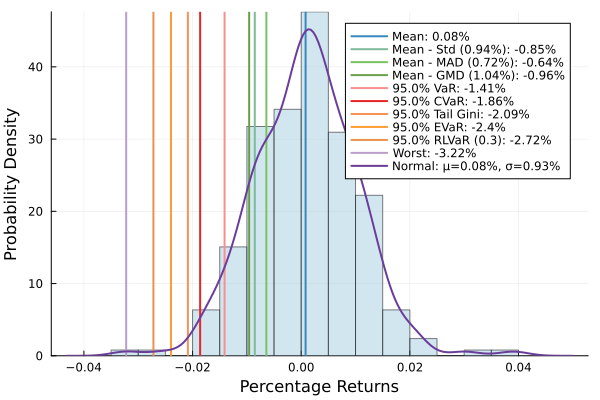
We can plot the histogram of portfolio returns.
# Plot histogram of returns.
plot_histogram(mip_res.w, rd.X, slv)
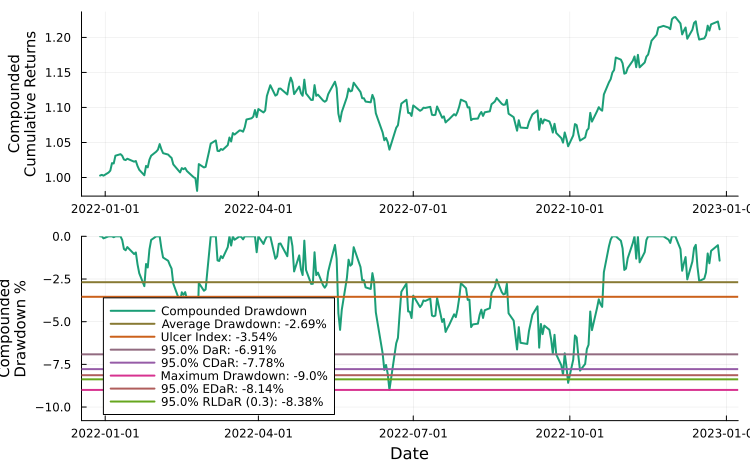
We can plot the portfolio drawdowns, in this case compound drawdowns.
# Plot compounded drawdowns.
plot_drawdowns(mip_res.w, rd.X, slv; ts = rd.ts, compound = true)
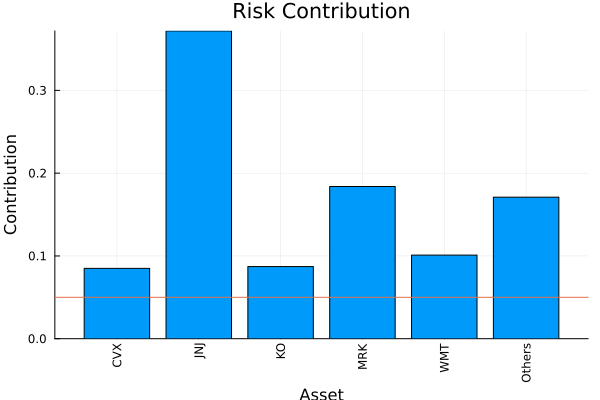
Furthermore, we can also plot the risk contribution per asset. For this, we must provide an instance of the risk measure we want to use with the appropriate statistics/parameters. We can do this by using the factory function (recommended when doing so programmatically), or manually set the quantities ourselves.
# Plot the risk contribution per asset.
plot_risk_contribution(factory(Variance(), res.pr), mip_res.w, rd.X; nx = rd.nx,
percentage = true)
This awkwardness is due to the fact that PortfolioOptimisers.jl tries to decouple the risk measures from optimisation estimators and results. However, the advantage of this approach is that it lets us use multiple different risk measures as part of the risk expression, or as risk limits in optimisations. We explore this further in the examples.
We can also plot the returns' histogram and probability density.
plot_histogram(mip_res.w, rd.X, slv)
We can also plot the compounded or uncompounded drawdowns, here we plot the former.
plot_drawdowns(mip_res.w, rd.X, slv; ts = rd.ts, compound = true)
There are other kinds of plots which we explore in the examples.
For a roadmap of planned and desired features in no particular order please refer to Issue #37.
Some docstrings are incomplete and/or outdated, please refer to Issue #58 for details on what docstrings have been completed in the dev branch.
This section is under active development so any [<name>]-(@ref) lacks docstrings.
Prices to returns prices_to_returns and ReturnsResult
Find complete indices find_complete_indices
Find uncorrelated indices [find_uncorrelated_indices]-(@ref)
Denoise, denoise!, denoiseSpectral SpectralDenoise
Fixed FixedDenoise
Shrunk ShrunkDenoise
Matrix processing pipeline DenoiseDetoneAlgMatrixProcessing, matrix_processing!, matrix_processing, DenoiseDetoneAlg, DenoiseAlgDetone, DetoneDenoiseAlg, DetoneAlgDenoise, AlgDenoiseDetone, AlgDetoneDenoise
Factor prior models and implied volatility use regression in their estimation, which return a Regression object.
Linear model LinearModel
Generalised linear model GeneralisedLinearModel
StepwiseRegressionDimensionReductionRegressionOverloads Statistics.mean.
Optionally weighted expected returns SimpleExpectedReturns
Equilibrium expected returns with custom covariance EquilibriumExpectedReturns
Excess expected returns with custom expected returns estimator ExcessExpectedReturns
ShrunkExpectedReturnsJames-Stein JamesStein
Bayes-Stein BayesStein
Bodnar-Okhrin-Parolya BodnarOkhrinParolya
Grand Mean GrandMean
Volatility Weighted VolatilityWeighted
Mean Squared Error MeanSquaredError
Standard deviation expected returns [StandardDeviationExpectedReturns]-(@ref)
Overloads Statistics.var and Statistics.std.
SimpleVarianceOverloads Statistics.cov and Statistics.cor.
Optionally weighted covariance with custom covariance estimator GeneralCovariance
CovarianceGerberCovarianceGerber 0 StandardisedGerber0
Gerber 1 StandardisedGerber1
Gerber 2 StandardisedGerber2
SmythBrobyCovarianceSmyth-Broby 0 SmythBroby0
Smyth-Broby 1 SmythBroby1
Smyth-Broby 2 SmythBroby2
Smyth-Broby-Gerber 0 SmythBrobyGerber0
Smyth-Broby-Gerber 1 SmythBrobyGerber1
Smyth-Broby-Gerber 2 SmythBrobyGerber2
Smyth-Broby 0 StandardisedSmythBroby0
Smyth-Broby 1 StandardisedSmythBroby1
Smyth-Broby 2 StandardisedSmythBroby2
Smyth-Broby-Gerber 0 StandardisedSmythBrobyGerber0
Smyth-Broby-Gerber 1 StandardisedSmythBrobyGerber1
Smyth-Broby-Gerber 2 StandardisedSmythBrobyGerber2
Distance covariance with custom distance estimator via Distances.jl DistanceCovariance
Lower Tail Dependence covariance LowerTailDependenceCovariance
Kendall covariance KendallCovariance
Spearman covariance SpearmanCovariance
MutualInfoCovarianceAstroPy-defined binsKnuth's optimal bin width Knuth
Freedman Diaconis bin width FreedmanDiaconis
Scott's bin width Scott
Hacine-Gharbi-Ravier bin width HacineGharbiRavier
Predefined number of bins
Denoised covariance with custom covariance estimator DenoiseCovariance
Detoned covariance with custom covariance estimator DetoneCovariance
Custom processed covariance with custom covariance estimator ProcessedCovariance
ImpliedVolatility]-(@ref)Premium [ImpliedVolatilityPremium]-(@ref)
Regression [ImpliedVolatilityRegression]-(@ref)
Covariance with custom covariance estimator and matrix processing pipeline PortfolioOptimisersCovariance
Correlation covariance [CorrelationCovariance]-(@ref)
Implements coskewness.
CoskewnessImplements cokurtosis.
CokurtosisImplements distance and cor_and_dist.
First order distance estimator with custom distance algorithm, and optional exponent Distance
Second order distance estimator with custom pairwise distance algorithm from Distances.jl, custom distance algorithm, and optional exponent DistanceDistance
The distance estimators are used together with various distance matrix algorithms.
Simple distance SimpleDistance
Simple absolute distance SimpleAbsoluteDistance
Logarithmic distance LogDistance
Correlation distance CorrelationDistance
VariationInfoDistanceAstroPy-defined binsKnuth's optimal bin width Knuth
Freedman Diaconis bin width FreedmanDiaconis
Scott's bin width Scott
Hacine-Gharbi-Ravier bin width HacineGharbiRavier
Predefined number of bins
Canonical distance CanonicalDistance
PortfolioOptimisers.jl can make use of asset relationships to perform optimisations, define constraints, and compute relatedness characteristics of portfolios.
Phylogeny constraints and clustering optimisations make use of clustering algorithms via ClustersEstimator, Clusters, and clusterise. Most clustering algorithms come from Clustering.jl.
OptimalNumberClusters and VectorToScalarMeasureSecond order difference SecondOrderDifference
Silhouette scores SilhouetteScore
Predefined number of clusters.
Hierarchical clustering HClustAlgorithm
Direct Bubble Hierarchical Trees DBHT and Local Global sparsification of the covariance matrix LoGo, logo!, and [logo]-(@ref)
Non-hierarchical clustering algorithms are incompatible with hierarchical clustering optimisations, but they can be used for phylogeny constraints and [NestedClustered]-(@ref) optimisations.
KMeansAlgorithm]-(@ref)Adjacency matrices encode asset relationships either with clustering or graph theory via phylogeny_matrix and PhylogenyResult.
NetworkEstimator with custom tree algorithms, covariance, and distance estimatorsMinimum spanning trees KruskalTree, BoruvkaTree, PrimTree
Maximum distance similarity MaximumDistanceSimilarity
Exponential similarity ExponentialSimilarity
General exponential similarity GeneralExponentialSimilarity
Clustering adjacency ClustersEstimator and Clusters
CentralityEstimator with custom adjacency matrix estimators (clustering and network) and centrality measuresBetweenness BetweennessCentrality
Closeness ClosenessCentrality
Degree DegreeCentrality
Eigenvector EigenvectorCentrality
Katz KatzCentrality
Pagerank Pagerank
Radiality RadialityCentrality
Stress StressCentrality
Centrality vector centrality_vector
Average centrality average_centrality
The asset phylogeny score asset_phylogeny
Non clustering optimisers support a wide range of constraints, while naive and clustering optimisers only support weight bounds. Furthermore, entropy pooling prior supports a variety of views constraints. It is therefore important to provide users with the ability to generate constraints manually and/or programmatically. We therefore provide a wide, robust, and extensible range of types such as AbstractEstimatorValueAlgorithm and UniformValues, and functions that make this easy, fast, and safe.
Constraints can be defined via their estimators or directly by their result types. Some using estimators need to map key-value pairs to the asset universe, this is done by defining the assets and asset groups in AssetSets. Internally, PortfolioOptimisers.jl uses all the information and calls group_to_val!, and replace_group_by_assets to produce the appropriate arrays.
Equation parsing parse_equation and ParsingResult.
Linear constraints linear_constraints, LinearConstraintEstimator, PartialLinearConstraint, and LinearConstraint
Risk budgeting constraints risk_budget_constraints, RiskBudgetEstimator, and RiskBudget
Phylogeny constraints phylogeny_constraints, centrality_constraints, SemiDefinitePhylogenyEstimator, SemiDefinitePhylogeny, IntegerPhylogenyEstimator, IntegerPhylogeny, CentralityConstraint
Weight bounds constraints weight_bounds_constraints, WeightBoundsEstimator, WeightBounds
Asset set matrices asset_sets_matrix and AssetSetsMatrixEstimator
Threshold constraints threshold_constraints, ThresholdEstimator, and Threshold
Many optimisations and constraints use prior statistics computed via prior.
LowOrderPriorEmpirical EmpiricalPrior
Factor model FactorPrior
Vanilla BlackLittermanPrior
Bayesian BayesianBlackLittermanPrior
Factor model FactorBlackLittermanPrior
Augmented AugmentedBlackLittermanPrior
Entropy pooling EntropyPoolingPrior
Opinion pooling OpinionPoolingPrior
HighOrderPriorHigh order HighOrderPriorEstimator
High order factor model [HighOrderFactorPriorEstimator]-(@ref)
In order to make optimisations more robust to noise and measurement error, it is possible to define uncertainty sets on the expected returns and covariance. These can be used in optimisations which use either of these two quantities. These are implemented via ucs, mu_ucs, and sigma_ucs.
PortfolioOptimisers.jl implements two types of uncertainty sets.
EllipsoidalUncertaintySet and EllipsoidalUncertaintySetAlgorithm with various algorithms for computing the scaling parameter via k_ucsPredefined scaling parameter
It also implements various estimators for the uncertainty sets, the following two can generate box and ellipsoidal sets.
Normally distributed returns NormalUncertaintySet
ARCHUncertaintySet via archCircular CircularBootstrap
Moving MovingBootstrap
Stationary StationaryBootstrap
The following estimator can only generate box sets.
The turnover is defined as the element-wise absolute difference between the vector of current weights and a vector of benchmark weights. It can be used as a constraint, method for fee calculation, and risk measure. These are all implemented using turnover_constraints, TurnoverEstimator, and Turnover.
Fees are a non-negligible aspect of active investing. As such PortfolioOptimiser.jl has the ability to account for them in all optimisations but the naive ones. They can also be used to adjust expected returns calculations via calc_fees and calc_asset_fees.
FeesEstimator and FeesProportional long
Proportional short
Fixed long
Fixed short
Turnover
Various risk measures and analyses require the computation of simple and cumulative portfolio returns and drawdowns both in aggregate and per-asset. These are computed by calc_net_returns, calc_net_asset_returns, cumulative_returns, drawdowns.
It is often useful to create portfolios that track the performance of an index, indicator, or another portfolio.
tracking_benchmark, TrackingErrorReturns tracking ReturnsTracking
Weights tracking WeightsTracking
The error can be computed using different algorithms using norm_tracking.
L1-norm L1Tracking
L2-norm L2Tracking
L2-norm squared SquaredL2Tracking
Lp-norm [LpTracking]-(@ref)
L-Inf-norm [LInfTracking]-(@ref)
It is also possible to track the error in with risk measures [RiskTrackingError]-(@ref) using WeightsTracking, which allows for two approaches.
Dependent variable tracking DependentVariableTracking
Independent variable tracking IndependentVariableTracking
PortfolioOptimisers.jl provides a wide range of risk measures. These are broadly categorised into two types based on the type of optimisations that support them.
These are all subtypes of RiskMeasure, and are supported by all optimisation estimators.
Variance]Risk contribution
Quadratic risk expression QuadRiskExpr
Squared second order cone SquaredSOCRiskExpr
Standard deviation StandardDeviation
Uncertainty set variance UncertaintySetVariance (same as variance when used in non-traditional optimisation)
LowOrderMomentFirst lower moment FirstLowerMoment
Mean absolute deviation MeanAbsoluteDeviation
SecondMomentScenario variance Full
Scenario semi-variance Semi
Quadratic risk expression QuadRiskExpr
Squared second order cone SquaredSOCRiskExpr
Rotated second order cone RSOCRiskExpr
SOCRiskExprKurtosisActual kurtosis
Quadratic risk expression QuadRiskExpr
Squared second order cone SquaredSOCRiskExpr
Rotated second order cone RSOCRiskExpr
SOCRiskExprNegativeSkewness]-(@ref)Quadratic risk expression QuadRiskExpr
Squared second order cone SquaredSOCRiskExpr
Square root negative skewness SOCRiskExpr
ValueatRisk]-(@ref)Exact MIP formulation [MIPValueatRisk]-(@ref)
Approximate distribution based [DistributionValueatRisk]-(@ref)
ValueatRiskRange]-(@ref)Exact MIP formulation [MIPValueatRisk]-(@ref)
Approximate distribution based [DistributionValueatRisk]-(@ref)
Drawdown at Risk [DrawdownatRisk]-(@ref)
Conditional Value at Risk [ConditionalValueatRisk]-(@ref)
Distributionally Robust Conditional Value at Risk [DistributionallyRobustConditionalValueatRisk]-(@ref) (same as conditional value at risk when used in non-traditional optimisation)
Conditional Value at Risk Range [ConditionalValueatRiskRange]-(@ref)
Distributionally Robust Conditional Value at Risk Range [DistributionallyRobustConditionalValueatRiskRange]-(@ref) (same as conditional value at risk range when used in non-traditional optimisation)
Conditional Drawdown at Risk [ConditionalDrawdownatRisk]-(@ref)
Distributionally Robust Conditional Drawdown at Risk [DistributionallyRobustConditionalDrawdownatRisk]-(@ref)(same as conditional drawdown at risk when used in non-traditional optimisation)
Entropic Value at Risk [EntropicValueatRisk]-(@ref)
Entropic Value at Risk Range [EntropicValueatRiskRange]-(@ref)
Entropic Drawdown at Risk [EntropicDrawdownatRisk]-(@ref)
Relativistic Value at Risk [RelativisticValueatRisk]-(@ref)
Relativistic Value at Risk Range [RelativisticValueatRiskRange]-(@ref)
Relativistic Drawdown at Risk [RelativisticDrawdownatRisk]-(@ref)
Ordered Weights Array risk measure [OrderedWeightsArray]-(@ref)
Ordered Weights Array range risk measure [OrderedWeightsArrayRange]-(@ref)
Exact [ExactOrderedWeightsArray]-(@ref)
Approximate [ApproxOrderedWeightsArray]-(@ref)
Gini Mean Difference owa_gmd
Worst Realisation owa_wr
Range owa_rg
Conditional Value at Risk owa_cvar
Weighted Conditional Value at Risk owa_wcvar
Conditional Value at Risk Range owa_cvarrg
Weighted Conditional Value at Risk Range owa_wcvarrg
Tail Gini owa_tg
Tail Gini Range owa_tgrg
Linear Moment owa_l_moment
owa_l_moment_crmMaximumEntropy]-(@ref)Exponential Cone Entropy [ExponentialConeEntropy]-(@ref)
Relative Entropy [RelativeEntropy]-(@ref)
Minimum Squared Distance [MinimumSquaredDistance]-(@ref)
Minimum Sum Squares [MinimumSumSquares]-(@ref)
Average Drawdown [AverageDrawdown]-(@ref)
Ulcer Index [UlcerIndex]-(@ref)
Maximum Drawdown [MaximumDrawdown]-(@ref)
BrownianDistanceVariance]-(@ref)Norm one cone Brownian distance variance [NormOneConeBrownianDistanceVariance]-(@ref)
Inequality Brownian distance variance [IneqBrownianDistanceVariance]-(@ref)
Quadratic risk expression QuadRiskExpr
Rotated second order cone RSOCRiskExpr
Worst Realisation [WorstRealisation]-(@ref)
Range [Range]-(@ref)
Turnover Risk Measure [TurnoverRiskMeasure]-(@ref)
TrackingRiskMeasure]-(@ref)L1-norm L1Tracking
L2-norm L2Tracking
L2-norm squared SquaredL2Tracking
Lp-norm [LpTracking]-(@ref)
L-Inf-norm [LInfTracking]-(@ref)
Dependent variable tracking DependentVariableTracking
Independent variable tracking IndependentVariableTracking
Power Norm Value at Risk [PowerNormValueatRisk]-(@ref)
Power Norm Value at Risk Range [PowerNormValueatRiskRange]-(@ref)
Power Norm Drawdown at Risk [PowerNormDrawdownatRisk]-(@ref)
These are all subtypes of HierarchicalRiskMeasure, and are only supported by hierarchical optimisation estimators.
HighOrderMomentUnstandardised third lower moment ThirdLowerMoment
Standardised third lower moment StandardisedHighOrderMoment and ThirdLowerMoment
FourthMomentStandardisedHighOrderMoment and FourthMomentRelative Drawdown at Risk [RelativeDrawdownatRisk]-(@ref)
Relative Conditional Drawdown at Risk [RelativeConditionalDrawdownatRisk]-(@ref)
Relative Entropic Drawdown at Risk [RelativeEntropicDrawdownatRisk]-(@ref)
Relative Relativistic Drawdown at Risk [RelativeRelativisticDrawdownatRisk]-(@ref)
Relative Average Drawdown [RelativeAverageDrawdown]-(@ref)
Relative Ulcer Index [RelativeUlcerIndex]-(@ref)
Relative Maximum Drawdown [RelativeMaximumDrawdown]-(@ref)
Relative Power Norm Drawdown at Risk [RelativePowerNormDrawdownatRisk]-(@ref)
Risk Ratio Risk Measure [RiskRatioRiskMeasure]-(@ref)
Equal Risk Measure [EqualRiskMeasure]-(@ref)
Median Absolute Deviation [MedianAbsoluteDeviation]-(@ref)
These risk measures are unsuitable for optimisation because they can return negative values. However, they can be used for performance metrics.
Mean Return [MeanReturn]-(@ref)
Third Central Moment [ThirdCentralMoment]-@(ref)
Skewness [Skewness]-(@ref)
Return Risk Measure ExpectedReturn
Return Risk Ratio Risk Measure ExpectedReturnRiskRatio
Expected risk [expected_risk]-(@ref)
Number of effective assets [number_effective_assets]-(@ref)
Asset risk contribution [risk_contribution]-(@ref)
Factor risk contribution [factor_risk_contribution]-(@ref)
expected_returnArithmetic [ArithmeticReturn]-(@ref)
Logarithmic [LogarithmicReturn]-(@ref)
Expected risk-adjusted return ratio expected_ratio and expected_risk_ret_ratio
Expected risk-adjusted ratio information criterion expected_sric and expected_risk_ret_sric
Brinson performance attribution brinson_attribution
Optimisations are implemented via [optimise]-(@ref). Optimisations consume an estimator and return a result.
These return a [NaiveOptimisationResult]-(@ref).
Inverse Volatility [InverseVolatility]-(@ref)
Equal Weighted [EqualWeighted]-(@ref)
Random (Dirichlet) [RandomWeighted]-(@ref)
Weight bounds WeightBoundsEstimator, UniformValues, and WeightBounds
Iterative Weight Finaliser [IterativeWeightFinaliser]-(@ref)
JuMPWeightFinaliser]-(@ref)Relative Error Weight Finaliser [RelativeErrorWeightFinaliser]-(@ref)
Squared Relative Error Weight Finaliser [SquaredRelativeErrorWeightFinaliser]-(@ref)
Absolute Error Weight Finaliser [AbsoluteErrorWeightFinaliser]-(@ref)
Squared Absolute Error Weight Finaliser [SquaredAbsoluteErrorWeightFinaliser]-(@ref)
These optimisations are implemented as JuMP problems and make use of [JuMPOptimiser]-(@ref), which encodes all supported constraints.
These optimisations support a variety of objective functions.
Minimum risk [MinimumRisk]-(@ref)
Maximum utility [MaximumUtility]-(@ref)
Maximum return over risk ratio [MaximumRatio]-(@ref)
Maximum return [MaximumReturn]-(@ref)
MeanRisk]-(@ref) and [NearOptimalCentering]-(@ref)FrontierReturn based
Risk based
Mean-Risk [MeanRisk]-(@ref) returns a [MeanRiskResult]-(@ref)
Near Optimal Centering [NearOptimalCentering]-(@ref) returns a [NearOptimalCenteringResult]-(@ref)
Factor Risk Contribution [FactorRiskContribution]-(@ref) returns a [FactorRiskContributionResult]-(@ref)
These optimisations attempt to achieve weight values according to a risk budget vector. This vector can be provided on a per asset or per factor basis.
Asset risk budgeting [AssetRiskBudgeting]-(@ref)
Factor risk budgeting [FactorRiskBudgeting]-(@ref)
Risk Budgeting [RiskBudgeting]-(@ref) returns a [RiskBudgetingResult]-(@ref)
RelaxedRiskBudgeting]-(@ref) returns a [RiskBudgetingResult]-(@ref)Basic [BasicRelaxedRiskBudgeting]-(@ref)
Regularised [RegularisedRelaxedRiskBudgeting]-(@ref)
Regularised and penalised [RegularisedPenalisedRelaxedRiskBudgeting]-(@ref)
Custom objective penalty [CustomJuMPObjective]-(@ref)
Weight bounds WeightBoundsEstimator, UniformValues, and WeightBounds
Long
Short
Exact
Range [BudgetRange]-(@ref)
ThresholdEstimator and ThresholdLong
Short
Asset
Linear constraints LinearConstraintEstimator and LinearConstraint
Centralit(y/ies) CentralityEstimator
Asset
Asset group(s) LinearConstraintEstimator and LinearConstraint
Set(s)
Set group(s) LinearConstraintEstimator and LinearConstraint
Turnover(s) TurnoverEstimator and Turnover
Fees FeesEstimator and Fees
Tracking error(s) TrackingError
Phylogen(y/ies) IntegerPhylogenyEstimator and SemiDefinitePhylogenyEstimator
ArithmeticReturn]-(@ref)Uncertainty set BoxUncertaintySet, BoxUncertaintySetAlgorithm, EllipsoidalUncertaintySet, and EllipsoidalUncertaintySetAlgorithm
Custom expected returns vector
Logarithmic returns [LogarithmicReturn]-(@ref)
Weighted sum SumScalariser
Maximum value MaxScalariser
Log-sum-exp LogSumExpScalariser
Custom constraint
Number of effective assets
L1
L2
Lp [LpRegularisation]-(@ref)
L-Inf
Clustering optimisations make use of asset relationships to either minimise the risk exposure by breaking the asset universe into subsets which are hierarchically or individually optimised.
These optimisations minimise risk by hierarchically splitting the asset universe into subsets, computing the risk of each subset, and combining them according to their hierarchy.
Hierarchical Risk Parity [HierarchicalRiskParity]-(@ref) returns a [HierarchicalResult]-(@ref)
Hierarchical Equal Risk Contribution [HierarchicalEqualRiskContribution]-(@ref) returns a [HierarchicalResult]-(@ref)
Weight bounds WeightBoundsEstimator, UniformValues, and WeightBounds
Fees FeesEstimator and Fees
Weighted sum SumScalariser
Maximum value MaxScalariser
Log-sum-exp LogSumExpScalariser
Iterative Weight Finaliser [IterativeWeightFinaliser]-(@ref)
JuMPWeightFinaliser]-(@ref)Relative Error Weight Finaliser [RelativeErrorWeightFinaliser]-(@ref)
Squared Relative Error Weight Finaliser [SquaredRelativeErrorWeightFinaliser]-(@ref)
Absolute Error Weight Finaliser [AbsoluteErrorWeightFinaliser]-(@ref)
Squared Absolute Error Weight Finaliser [SquaredAbsoluteErrorWeightFinaliser]-(@ref)
Schur complementary hierarchical risk parity provides a bridge between mean variance optimisation and hierarchical risk parity by using an interpolation parameter. It converges to hierarchical risk parity, and approximates mean variance by adjusting this parameter. It uses the Schur complement to adjust the weights of a portfolio according to how much more useful information is gained by assigning more weight to a group of assets.
SchurComplementHierarchicalRiskParity]-(@ref) returns a [SchurComplementHierarchicalRiskParityResult]-(@ref)Weight bounds WeightBoundsEstimator, UniformValues, and WeightBounds
Fees FeesEstimator and Fees
Iterative Weight Finaliser [IterativeWeightFinaliser]-(@ref)
JuMPWeightFinaliser]-(@ref)Relative Error Weight Finaliser [RelativeErrorWeightFinaliser]-(@ref)
Squared Relative Error Weight Finaliser [SquaredRelativeErrorWeightFinaliser]-(@ref)
Absolute Error Weight Finaliser [AbsoluteErrorWeightFinaliser]-(@ref)
Squared Absolute Error Weight Finaliser [SquaredAbsoluteErrorWeightFinaliser]-(@ref)
Nested clustered optimisation breaks the asset universe of size N into C smaller subsets and treats every subset as an individual portfolio. The weights assigned to each asset are placed in an N×C matrix. In each column, non-zero values correspond to assets assigned to that subset, this means that assets only contribute to the column (and therefore synthetic asset) corresponding to their assigned subset. In other words, each row of the matrix contains a single non-zero value and each row contains as many non-zero values as there are assets in that subset.
From here there are two options:
Compute the returns matrix of the synthetic assets directly by multiplying the original T×N matrix by the N×C matrix of asset weights to produce a T×C matrix of predicted returns, where T is the number of observations.
For each subset perform a cross validation prediction, yielding a vector of returns for that subset. These vectors are then horizontally concatenated into a Y×C matrix of cross-validation predicted returns, where Y ≤ T because the cross validation may not use the full history.
This matrix of predicted returns is then used by the outer optimisation estimator to generate an optimisation of the synthetic assets. This produces a C×1 vector, essentially optimising a portfolio of asset clusters. The final weights are the product of the original N×C matrix of asset weights per cluster by the C×1 vector of optimal synthetic asset weights to produce the final N×1 vector of asset weights.
NestedClustered]-(@ref) returns a [NestedClusteredResult]-(@ref)Any features supported by the inner and outer estimators.
Weight bounds WeightBoundsEstimator, UniformValues, and WeightBounds
Iterative Weight Finaliser [IterativeWeightFinaliser]-(@ref)
JuMPWeightFinaliser]-(@ref)Relative Error Weight Finaliser [RelativeErrorWeightFinaliser]-(@ref)
Squared Relative Error Weight Finaliser [SquaredRelativeErrorWeightFinaliser]-(@ref)
Absolute Error Weight Finaliser [AbsoluteErrorWeightFinaliser]-(@ref)
Squared Absolute Error Weight Finaliser [SquaredAbsoluteErrorWeightFinaliser]-(@ref)
Cross validation predictor for the outer estimator
These work similar to the Nested Clustered estimator, only instead of breaking the asset universe into subsets, a list of inner estimators is provided. The procedure is then exactly the same as the nested clusters optimisation, only instead of an N×C matrix of asset weights where each column corresponds to a subset of assets, each column corresponds to a completely independent and isolated inner estimator, which also means there is no enforced sparsity pattern on this matrix.
Stacking]-(@ref) returns a [StackingResult]-(@ref)Any features supported by the inner and outer estimators.
Weight bounds WeightBoundsEstimator, UniformValues, and WeightBounds
Iterative Weight Finaliser [IterativeWeightFinaliser]-(@ref)
JuMPWeightFinaliser]-(@ref)Relative Error Weight Finaliser [RelativeErrorWeightFinaliser]-(@ref)
Squared Relative Error Weight Finaliser [SquaredRelativeErrorWeightFinaliser]-(@ref)
Absolute Error Weight Finaliser [AbsoluteErrorWeightFinaliser]-(@ref)
Squared Absolute Error Weight Finaliser [SquaredAbsoluteErrorWeightFinaliser]-(@ref)
Cross validation predictor for the outer estimator
Unlike all other estimators, finite allocation does not yield an "optimal" value, but rather the optimal attainable solution based on a finite amount of capital. They use the result of other estimations, the latest prices, and a cash amount.
DiscreteAllocation]-(@ref)Iterative Weight Finaliser [IterativeWeightFinaliser]-(@ref)
JuMPWeightFinaliser]-(@ref)Relative Error Weight Finaliser [RelativeErrorWeightFinaliser]-(@ref)
Squared Relative Error Weight Finaliser [SquaredRelativeErrorWeightFinaliser]-(@ref)
Absolute Error Weight Finaliser [AbsoluteErrorWeightFinaliser]-(@ref)
Squared Absolute Error Weight Finaliser [SquaredAbsoluteErrorWeightFinaliser]-(@ref)
Greedy [GreedyAllocation]
Prediction on unseen data [PredictionReturnsResult]-(@ref), [PredictionResult]-(@ref), [MultiPeriodPredictionResult]-(@ref), [PopulationPredictionResult]-(@ref) via [predict]-(@ref), [fit_and_predict]-(@ref)
Prediction scoring via [PredictionCrossValScorer]-(@ref), [NearestQuantilePrediction]-(@ref), and [quantile_by_measure]-(@ref)
split]-(@ref) and [cross_val_predict]-(@ref)K-Fold KFold returns a [KFoldResult]-(@ref)
Combinatorial CombinatorialCrossValidation returns a [CombinatorialCrossValidationResult]-(@ref)
WalkForward]-(@ref) return a [WalkForwardResult]-(@ref)IndexWalkForward, DateWalkForwardMultiple randomised [MultipleRandomised]-(@ref) returns a [MultipleRandomisedResult]-(@ref)
Visualising the results is quite a useful way of summarising the portfolio characteristics or evolution. To this extent we provide a few plotting functions with more to come.
Portfolio [plot_ptf_cumulative_returns]-(@ref).
Assets [plot_asset_cumulative_returns]-(@ref).
Single portfolio [plot_composition]-(@ref).
Stacked bar [plot_stacked_bar_composition]-(@ref).
Stacked area [plot_stacked_area_composition]-(@ref).
Asset risk contribution [plot_risk_contribution]-(@ref).
Factor risk contribution [plot_factor_risk_contribution]-(@ref).
Asset dendrogram [plot_dendrogram]-(@ref).
Asset clusters + optional dendrogram [plot_clusters]-(@ref).
Simple or compound drawdowns [plot_drawdowns]-(@ref).
Portfolio returns histogram + density [plot_histogram]-(@ref).
2/3D risk measure scatter plots [plot_measures]-(@ref).